
Booking Links Aren’t an AI Calendar — Pick the Right One for Your Week
External booking links solve client scheduling; AI day planners protect focus blocks. Mixing them up costs hours and control. A practical split for freelancers and managers.
Monday 9:12. A prospect books the only gap you had for deep work. Tuesday, your AI planner shuffles three habits to make room for another intro call you never meant to offer at that priority. By Friday you have a full calendar, thin deliverables, and the vague sense that “scheduling tools” made the week worse.
The mistake is usually category confusion. A booking link and an AI calendar both touch your availability. They solve different jobs. Booking links sell access to your time; AI calendars defend the work that makes that time worth buying. Using one as if it were the other costs time (ב) and control (ג).
Two jobs, not two brands

Booking links sell open slots to outsiders; AI calendars defend focus, habits, and tasks inside a crowded week. Many freelancers and managers need both — with shared caps and buffers.
Credit: Linksh / Vesper · Visual · original (polished from Remy · Reporter draft). Not a vendor asset.
External booking (Calendly-style)
Job: let someone outside your head pick a slot without email ping-pong.
Calendly’s pricing page still frames the free tier around that job: one event type, one calendar connection, one-on-one scheduling, customizable booking page. Paid Teams sits at $16/seat/month on the yearly view Calendly shows publicly; invitees do not need seats. Higher tiers add routing forms, round-robin, payments via Stripe/PayPal, CRM hooks, and optional AI helpers (Notetaker, Callie for email-thread scheduling).
You need this when:
- Clients, candidates, or customers book you regularly.
- You sell timed sessions and want payment at booking.
- Your calendar still has real open space to offer.
You do not need this as your only system when your week is already packed with internal meetings and focus blocks — a bare booking page will either show “no times” or force you to delete the deep work that pays the bills.
AI day planner / calendar defense (Motion- and Reclaim-style)
Job: place and protect work inside an already crowded calendar — tasks, habits, focus, buffers — and reshuffle when reality changes.
Motion’s pricing positions Pro AI at $19/seat/month with AI Chat, projects/tasks, AI Calendar & Meetings, docs, and a task planner (credit bundle included). Business AI at $29/seat/month adds team capacity, dashboards, Gantt, time tracking, and permissions. Motion’s pitch is day construction: you feed tasks and deadlines; it proposes when the work happens.
Reclaim’s pricing sits as a calendar intelligence layer: Lite free for a single user (Focus Time, Habits, buffers, limited scheduling links); Starter ~$10/seat/month yearly ($12 monthly); Business ~$15 yearly ($18 monthly); Enterprise ~$22 yearly. Reclaim’s help clarifies seat bands and that annual billing discounts versus month-to-month. Reclaim also ships Scheduling Links — so it is not “Calendly or nothing” — but its core identity is defending Focus Time, Habits, Smart Meetings, and priority-aware availability (Reclaim’s Calendly comparison).
You need this when:
- Meetings already fill the week and focus keeps losing.
- Recurring 1:1s and habits need flexible placement, not fixed ghosts.
- You want tasks on the calendar before due dates slip.
You do not need a full AI planner merely to collect a deposit for a 30-minute consult — that is still a booking+payments job.
Who needs which (decision frame)
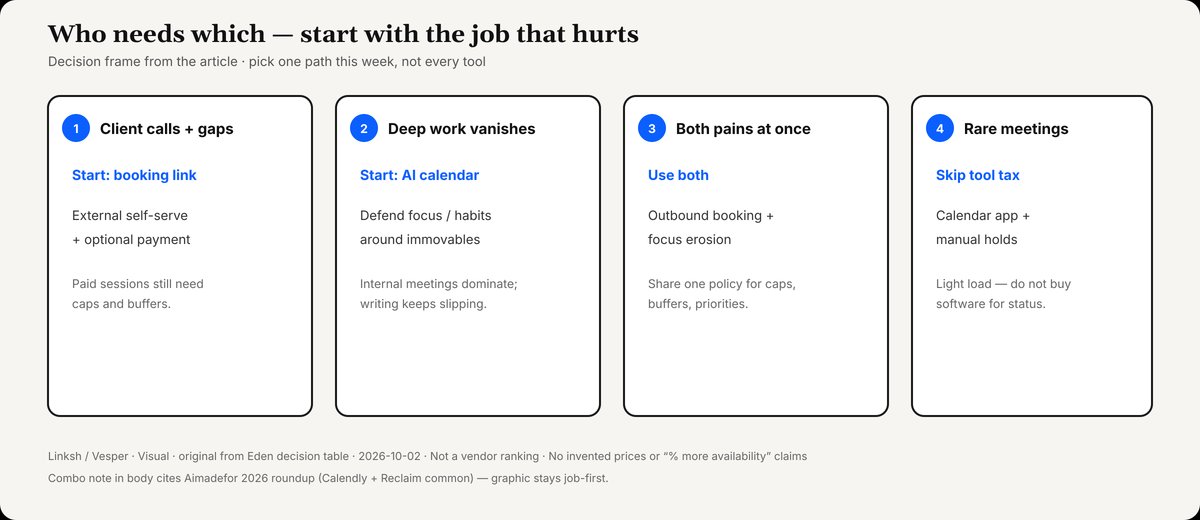
Who needs booking-first vs planner-first vs both — start with the job that hurts this week.
Credit: Linksh / Vesper · Visual · original from Eden decision table. Not a vendor ranking.
| Your week looks like… | Start with | Why |
|---|---|---|
| Client calls and paid sessions; calendar still has gaps | Booking link first | External self-serve + optional payment |
| Internal meetings dominate; deep work keeps vanishing | AI calendar first | Defend focus/habits around immovable events |
| Both: outbound booking and focus erosion | Both | Common recommendation in 2026 roundups |
| Rare meetings, light load | Calendar app + manual holds | Avoid tool tax |
AI Made For’s 2026 comparison puts it plainly: Calendly for external scheduling, Motion when you want AI to plan the day, Reclaim for calendar optimization — and Calendly + Reclaim as the combo most professionals benefit from. That matches the job split above; treat vendor “% more availability” marketing claims as marketing, not independent measurement.
When mixing them up burns hours
Booking tool used as a focus system. You leave large free blocks so the link looks “open,” then wonder why writing never happens. The booking product did its job: it offered free time. It will not invent priorities.
AI planner used as a client front door. Prospects get a confusing booking experience, or no payment step, or links that flex habits in ways you cannot explain in a sales email. Founders who need “pay to book a strategy call” still want a polished external booking flow (Reclaim notes Calendly’s payment strength; Calendly lists Stripe/PayPal on paid plans).
Double automation without rules. A booking link offers evenings; an AI agent also protects evenings for family Habits; something loses. Set explicit buffers, daily caps, and minimum notice on the booking side, and priority levels on the AI side, so the two systems share one policy.
Control checklist (ג)
Keep humans in charge of the week’s shape:
- Name immovable events (client workshops, school pickup, board) as busy — neither tool should treat them as optional.
- Cap bookings per day/week on external links so a viral LinkedIn post cannot sell your entire sprint.
- Buffer before/after client calls on the booking tool; add prep Habits on the AI tool if you use both.
- Priority for sales links: if your AI calendar can offer slots over low-priority holds, decide which holds are allowed to move — and which are not (Reclaim’s framing).
- Review reschedules weekly. If the AI moved deep work three times for intro calls, lower the booking link’s availability or raise Focus priority.
- One source of truth for video links and CRM so you do not maintain duplicate event types in two apps without a reason.
Time checklist (ב)
- Replace “when are you free?” threads with one booking link for external 1:1s.
- Put tasks with due dates into the AI planner instead of a sticky note graveyard.
- Protect a weekly Focus goal before you open more event types.
- If the booking page shows nothing for two weeks, you do not need a prettier link — you need calendar defense or fewer meeting types.
- Revisit seats: Calendly and Reclaim charge per host seat; invitees are free. Do not buy seats for people who only attend.
A practical split for freelancers and managers
Freelancer / consultant: Calendly-style link for discovery and paid sessions (payment on if you sell time). Reclaim- or Motion-style layer if billable deep work keeps getting shredded. Many solos start free on booking + free Lite/basic AI, then pay when caps and habits matter.
Manager / team lead: Booking or round-robin for hiring and partner calls; AI calendar for Focus Time norms and smarter 1:1 placement across a busy group. Business tiers matter when you need shared analytics, delegated access, or SSO — see each vendor’s live pricing.
Inside the AI bucket: choose Motion if you want tasks + docs + calendar in one work OS and will live inside it (Motion pricing). Choose Reclaim if you want a lighter overlay on Google/Outlook that defends Focus/Habits and can still share scheduling links (Reclaim pricing). You rarely need both AI planners.
This week’s move
Do not “evaluate seven AI calendars.” Pick the job that hurt last week:
- If the pain was email scheduling, ship one booking event type with buffers and a daily cap.
- If the pain was no deep work, set a Focus goal and one Habit in an AI calendar, and shrink public booking windows to match.
- If both hurt, run the combo on free/trial tiers for 14 days with written rules — then pay for the seat that enforced the rules you actually kept.
Use each tool for its job, and the week stops feeling like the tools are booking you.