
One Client Stack Beats Five Apps — How Solo Operators Are Collapsing CRM + Invoices
2026 guides keep pointing freelancers toward smaller all-in-one CRM/proposal/invoice stacks. A decision frame for when to consolidate vs keep specialized tools.
Solo operators rarely set out to run five products. It happens one gap at a time: a form tool for intake, a separate e-sign product for contracts, a card link for deposits, a spreadsheet for “CRM,” a calendar link for calls. Each tool is fine alone. Together they create version drift — the proposal says Net 14, the invoice says Net 30, and the CRM never learned the client closed.
That drift costs money (א): unbilled extras, deposits stuck in another tab, retainers that skip a month because the reminder lived in the wrong app. It also costs hours (ב): re-entering names and scope, plus client emails asking which link to use.
In 2026, freelancer-focused guides keep recommending smaller client stacks that combine CRM-ish pipeline views with proposals, contracts, and invoices. The useful question is not “which logo is best?” It is when consolidation pays for itself versus when specialized tools still win.
The five-app tax (what you are actually paying)
Count the real costs, not only subscription lines:
- Money: five base plans + payment processing fees in more than one place.
- Time: re-entering client names, addresses, and scope into every system.
- Error: mismatched amounts and terms across proposal and invoice.
- Client experience: three portals, three logins, three “where do I pay?” emails.
An all-in-one client stack tries to collapse lead capture → proposal → contract → invoice → payment into one client-facing thread. Vendor marketing will claim it replaces five platforms; treat that as a claim. Your job is to map your five and see overlap.
What “one client stack” means in practice
For service freelancers and small studios, the category usually includes:
- Contact / project record (lightweight CRM),
- Proposals or estimates,
- Contracts with e-sign,
- Invoices and payment collection,
- Often: scheduling, questionnaires, basic automation, a client portal.
It does not always replace a full accounting suite, a design tool, or a heavyweight sales CRM for multi-seat enterprise motion. Consolidation is about the client money path, not every app you own.
Decision frame: consolidate or stay specialized
Use this as a yes/no scorecard. Consolidate when most answers are yes:
- You sell repeatable packages. Same proposal shape, same contract skeleton, same invoice rhythm.
- One person owns sales-to-cash. Solo or tiny team; handoffs are you-to-you.
- Clients expect one professional link. Creatives, consultants, coaches, event freelancers — the HoneyBook/Dubsado/Bonsai cluster exists for this motion.
- Your “CRM” is mostly a list + stages, not territory routing and complex forecasting.
- You are losing hours to copy-paste between DocuSign-like tools, invoice tools, and spreadsheets.
- You will actually migrate open invoices and templates — consolidation fails when you run dual systems for six months “just in case” with no cutover date.
Stay specialized when:
- You need accounting-grade books, inventory, or payroll as the system of record (keep QuickBooks/Xero/etc.; connect or export).
- You manage many entities, subcontractors, or a true multi-pipeline sales team.
- Your current Stripe + contract + invoice chain already reconciles cleanly and nobody is confused.
- You operate in a region or payment mode the all-in-one does not support well — check the vendor’s regional/payment pages before you move.
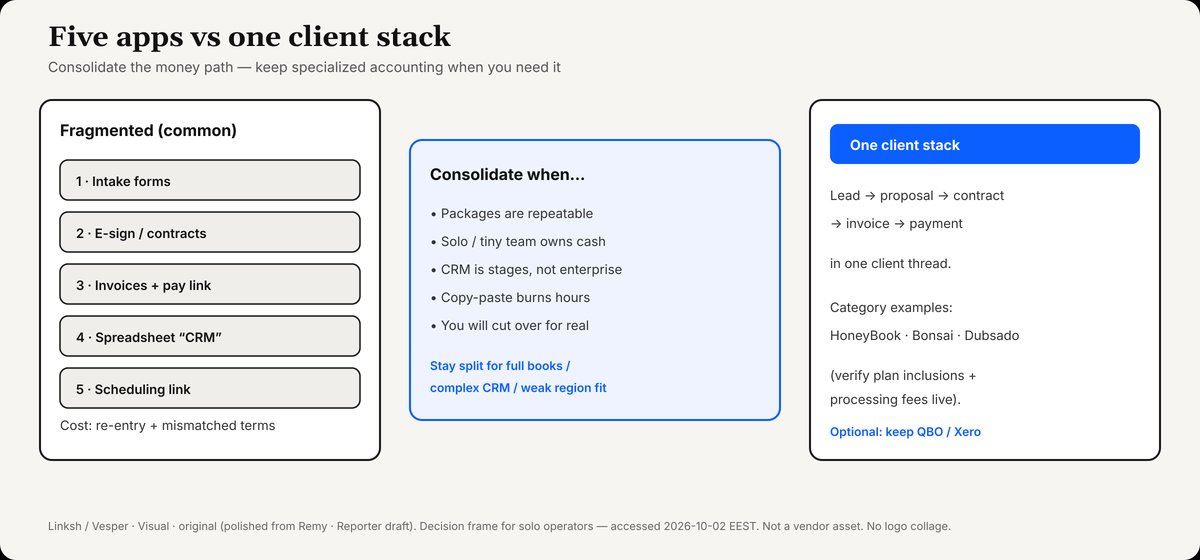
Fragmented intake/e-sign/invoice/CRM/calendar vs one client stack for proposal→contract→invoice→pay. Consolidate when packages are repeatable.
Credit: Linksh / Vesper · Visual · original (polished from Remy · Reporter draft). Not a vendor asset.
Four operator questions finish the filter (after the scorecard, before you buy):
- Where does money move? If card/ACH must live inside the client stack, compare processing fees against your current Stripe/PayPal effective rate — not against zero.
- Where does the contract live? If legal templates are custom and sacred, check whether the stack’s e-sign is good enough or whether you keep a specialist signer and accept less consolidation.
- How many stages do you really use? Lead → Active → Closed usually does not need enterprise CRM.
- What breaks on day two? Export path for contacts and invoices; who owns open proposals mid-migration; whether QuickBooks/Xero sync is required on day one.
Category examples (check live pricing the day you buy)
Prices below are as observed on vendor pages on 2026-10-02 where cited; vendors change them. This is a map of inclusions, not an endorsement.
HoneyBook — proposal-to-pay in one membership
HoneyBook’s pricing page lists a Starter plan at $29/month that includes unlimited clients and projects, invoices and payments, proposals and contracts, calendar, templates, client portal, basic reports, limited live lead forms, and HoneyBook AI. Essentials at $49/month adds scheduler, automations, QuickBooks Online integration, and more team/lead-form capacity. Premium sits at $109/month. The same page discloses card processing fees starting at 2.7% + 10¢ and bank transfer (ACH) fees at 1.5%.
HoneyBook also markets that it can do the job of several separate tools. Use that as a checklist of categories to compare — forms, scheduling, e-sign, invoicing — not as a guaranteed dollar saving.
Fit signal: solo creatives and service businesses who want clients to sign and pay inside one interactive file flow. Essentials is the plan to check if you need QBO sync on day one.
Bonsai — freelancer business OS with tier gotchas
Bonsai’s Help Center pricing article (July 13, 2026) describes plans for freelancers and small teams, free trial access to core workflows including invoicing and contracts, and payment processing fees that vary by provider and region. The Bonsai pricing page exposes Basic / Essentials / Premium ladders (annual and monthly price points were visible on access — re-open the page before you buy).
Independent 2026 guides such as Fastlancer’s freelancer CRM roundup and Freelance AI Daily’s HoneyBook vs Dubsado vs Bonsai vs Moxie repeatedly warn that the cheapest Bonsai rung may not include invoicing — Essentials-class tiers are where proposals/contracts/invoicing commonly line up. That gotcha matters more than which blog crowns a winner.
Fit signal: freelancers who want client docs plus time/expense style business tracking in one place — after confirming the tier includes invoices.
Dubsado — workflow depth for repeatable retainers
2026 comparison pieces such as Relvnt’s freelancer CRM guide and Fastlancer’s roundup position Dubsado as the automation-heavy option: forms trigger flows that send contracts, follow-ups, and invoices with less manual glue. They also note that the deeper automation features often sit on the higher plan. This article does not lock Dubsado dollar amounts (pricing page was not cleanly extractable at research time) — open dubsado.com/pricing and verify Starter vs Premier inclusions yourself.
Fit signal: retainer and high-volume service workflows where you will invest setup time in flows. Relvnt’s archetype framing is useful here: solo creatives optimizing for polished proposal→pay differ from retainer operators optimizing for automation depth — match archetype to stack, then confirm 2026 pricing on the vendor site.

Always compare processing fees + plan inclusions on vendor pricing pages — against your current effective rate, not against zero.
Credit: Linksh / Vesper · Visual · original. Operator hygiene — not tax or financial advice.
A consolidation checklist (no hype)
- Inventory every tool that touches a client from first inquiry to paid invoice.
- Mark duplicates (two places that store the same scope or amount).
- Pick one stack for a single service line as a pilot — not the whole business on Friday night.
- Rebuild one winning proposal + contract + invoice template before importing history.
- Turn off public links on the old form/e-sign tools on a named cutover date.
- Keep accounting software if you already rely on it; integrate or monthly-export rather than pretending a client stack is a full ledger.
- Re-read processing fees and payout timing before the first real client payment.
- After 30 days: count hours spent on admin and number of client “which link?” questions. Keep or revert based on that, not on a vendor ROI graphic.
Tools assemble the path; you still approve money before send — same discipline as AI-drafted invoices with a human on the button.
Bottom line
One client stack beats five apps when your sales-to-cash path is repeatable, your CRM needs are light, and you will cut over for real. HoneyBook, Bonsai, and Dubsado-class products are the 2026 gravity well for that motion — verify plan inclusions and processing fees on official pages the day you subscribe. Keep specialized accounting or heavy CRM when those are already your system of record. The win is fewer mismatched documents, fewer unpaid edges, and fewer hours lost to re-entry — not a promise that software alone grows revenue.
Sources accessed 2026-10-02 EEST. Prices and plan names change; always re-check vendor pricing before purchase. Not tax, legal, or financial advice.