
Shared Work AI That Waits for Your Tap Before It Sends
Team-shared assistants that touch mail, calendar, and chat only help if sensitive actions stay on-screen. How approval-before-send changes who should turn them on.
A personal chatbot that drafts an email is familiar. A shared assistant that can also send that email, post in Slack, or drop a calendar invite for the whole team is a different risk class. The useful products in this category are not the ones that boast full autonomy. They are the ones that can move work forward and still stop for a tap before a sensitive write leaves the building.
That tap is how you keep control (ג) without giving up the time win (ב): the agent assembles context; a human spends minutes on a readable approval card instead of hunting across inbox, CRM, and last week’s thread. This is a category frame — approval-before-send as the decision filter — not a single-vendor launch party.
What “shared work AI” means here
Shared work AI, for this article, means assistants or agents that:
- Are built once and reused by more than one person,
- Connect to work apps (mail, calendar, chat, docs, tickets),
- Can take multi-step actions, not only answer questions,
- Run in a team workspace with admin or builder controls.
That is different from a private chat history you never connect to Gmail. It is also different from a pure “draft in a side panel, you always copy-paste” helper. The moment an agent can press send, the product’s approval design becomes the product.
The control pattern: draft freely, gate the write
Across vendors, the healthy pattern looks the same in plain language:
- Let the agent read and draft.
- Treat send / post / create event / delete / pay as write actions.
- Default those writes to ask a human.
- Only loosen the gate for low-risk destinations after a real review.
If a vendor cannot show you where that gate lives, you do not yet have a shared-work tool you can staff safely — only a draft helper with an upgrade path you have not controlled.
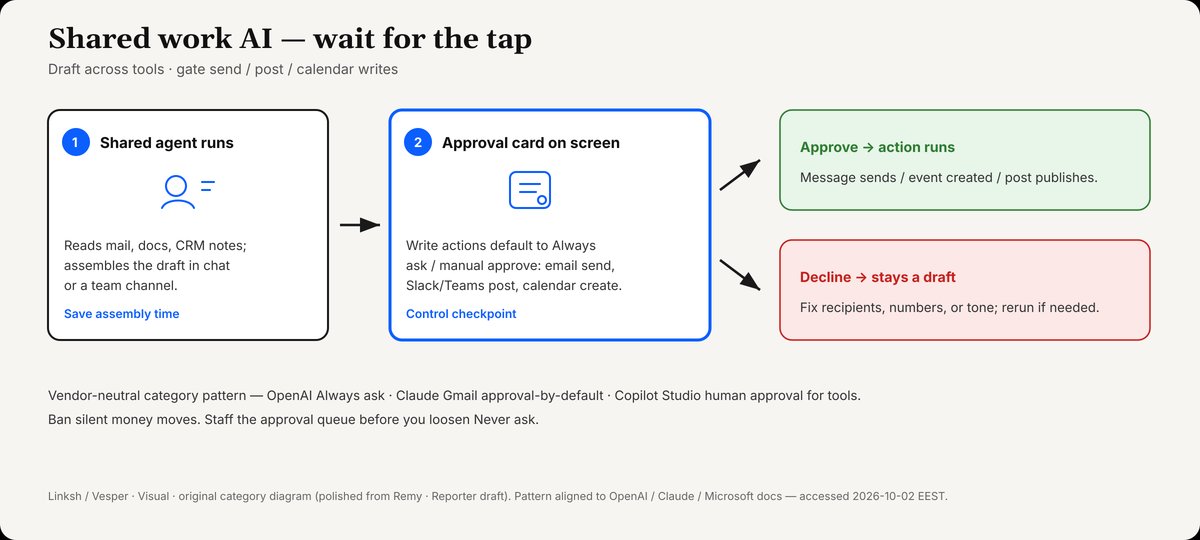
Shared agent drafts across tools; write actions pause for Approve or Decline before send/post/calendar create.
Credit: Linksh / Vesper · Visual · original category diagram (polished from Remy · Reporter draft). Pattern aligned to OpenAI / Claude / Microsoft docs — accessed 2026-10-02 EEST.
Where the time actually saves
The time win is real and narrow. The agent gathers what you would have hunted; you review recipient, subject, body, and destination channel on one card. Saying Decline must be culturally safe — if your team punishes blockers, people rubber-stamp, and you have theater instead of a control system.
Shared work AI saves time only after the approval path is staffed. Otherwise you trade typing time for incident time.
Product moment: OpenAI Workspace Agents (April 2026)
On April 22, 2026, OpenAI published Introducing workspace agents in ChatGPT. The post describes shared, cloud-hosted agents for teams on ChatGPT Business, Enterprise, Edu, and Teachers plans (research preview language in the body), usable in ChatGPT and Slack. Agents can gather context across tools, follow team processes, keep working on a schedule, and — critically — ask for approval when needed. OpenAI’s own framing for sensitive steps includes editing a spreadsheet, sending an email, or adding a calendar event.
SiliconANGLE’s same-day coverage corroborated the launch and the enterprise concern: companies still fear autonomous agents, and OpenAI’s answer includes limiting tools/data and requiring approval before sensitive actions. The launch post also noted an early free period through May 6, 2026, then credit-based pricing — check live pricing before you budget; this article will not invent credit rates.
OpenAI’s Help article ChatGPT Workspace Agents for Enterprise and Business is the operational source. Builders can connect apps such as Google Calendar, Google Drive, Slack, and SharePoint. By default, write actions for apps and connectors are set to Always ask during an agent run. Depending on the app, builders may set Never ask or Custom approvals for specific writes. Help warns to use write approvals carefully for workflows that can send, edit, post, or delete content. Enterprise workspaces can keep agents off until admins enable them; Slack shared (“agent-owned”) authentication carries an explicit risk note — other people may trigger actions through that connection.
That combination — shared agent + Always ask default + admin gates — is why Workspace Agents belong in a control story, not a hype story.
Category peers: the same idea, different shells
Claude and Gmail: approval before send by default
Anthropic’s Google Workspace connectors Help states that Claude can send, reply to, and forward Gmail messages, and that by default Claude asks for your approval before each of these actions. On Team and Enterprise plans, owners decide whether members may allow those actions to run without asking each time. The same Help notes that, by default, each action Claude takes on your behalf requires explicit approval.
Use Claude Cowork safely pushes the decision into modes: Automatically approve still screens actions; Skip all approvals removes that check; Manually approve is recommended when mistakes are hard to undo — including sending messages. Anthropic also states you remain responsible for messages sent on your behalf.
You do not need to prefer Claude over OpenAI to take the lesson: mail send is a gated write in serious agent designs.
Microsoft Copilot Studio: human approval for tool calls
Microsoft’s category signal is the same control idea inside a different stack. A Microsoft 365 Message Center item (RM570434), archived with a September 2026 GA window, describes Copilot Studio letting makers require human approval before an agent runs specific tools. A gated tool call pauses and shows what the agent intends; a person can approve, approve for the session, or deny — aimed at high-stakes operations such as sending emails, closing tickets, or processing payments, including inline in Teams and Microsoft 365 Copilot.
Separately, Microsoft Learn documents a Request information action in agent flows: pause automation, collect human input, then continue. That is human-in-the-loop as a first-class step, not an afterthought.
Phrase Microsoft carefully: Message Center roadmap language is not a claim that every tenant already flipped the toggle. It is evidence that the industry is standardizing on tap-before-tool.
Who should turn shared work AI on (and who should wait)
Good fit when:
- You have a repeatable workflow (weekly report, lead triage, FAQ routing) with a clear owner.
- Sensitive destinations are few and reviewable (one shared inbox folder, one Slack channel, one calendar).
- Builders will leave send/post/delete on Always ask / manual approve for the first weeks.
- An admin can disable the agent if it misbehaves.
Wait or narrow scope when:
- The agent would use a personal mailbox as a shared identity without understanding who else can trigger it (see OpenAI’s Slack shared-auth warning).
- Nobody will watch approval queues — an Always-ask gate with zero reviewers is a stalled queue, and the temptation will be to flip Never ask.
- The workflow includes payments, legal notices, HR, or customer secrets without a second pair of eyes.
- You cannot explain, in one sentence, what the agent is allowed to send.
A practical “tap to send” setup checklist
- Name the writes. List every action that leaves the team: email send, Slack post, calendar create, ticket close, CRM update, file share.
- Default to ask. On OpenAI-style agents, keep write actions on Always ask until you have audit evidence. On Claude, keep Gmail send approval on. On Copilot Studio, gate the send tool explicitly when available.
- Separate draft from deliver. Prefer “create draft” or “post to private review channel” over customer-facing send for the first month.
- Constrain connectors. Where the product supports constraints (OpenAI documents Connector Action Constraints in Help), limit recipients or destinations.
- Pick the channel. Shared Slack/Teams rooms need a human who owns approvals during working hours.
- Ban silent money moves. Payments and purchases stay manual.
- Review analytics. OpenAI’s launch post mentions usage analytics for shared agents; use whatever run history you have to see how often approvals fire and who is approving.
- Write a kill switch. Who can disable the agent in five minutes? Put that name in the team doc.
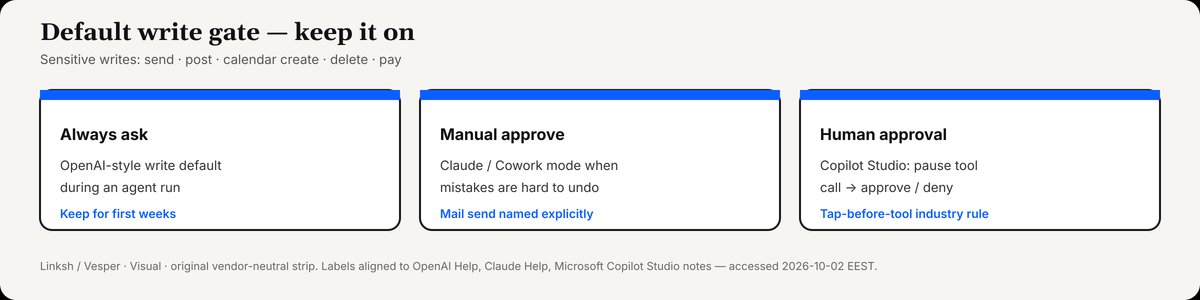
Default write gate: Always ask / Manual approve / Human approval for tool calls. Keep on for the first weeks.
Credit: Linksh / Vesper · Visual · original vendor-neutral strip. Labels aligned to OpenAI Help, Claude Help, Microsoft Copilot Studio notes.
Bottom line
Shared work AI is worth turning on when sensitive actions wait for a tap. OpenAI’s Workspace Agents made that pattern explicit for ChatGPT business teams in April 2026 with Always-ask write defaults; Claude’s Gmail connector and Microsoft’s Copilot Studio human-approval tooling show the same industry rule in other shells. Start with gated sends, small channels, and a named reviewer. Expand autonomy only where a wrong send is cheap to undo — which, for customer email, is almost never.
Sources accessed 2026-10-02 EEST. Plan availability and admin defaults change — re-check vendor Help before enabling agents in production.